Guide to MCP servers for transactional email (+ 7 real-world use cases)
 Duncan

Imagine asking AI to send emails, create and configure webhooks, or check your domain’s status, instead of heading into the platform’s dashboard to do the task. That’s exactly what this enables!
MCP is an exciting new way to interact with your email data, and one we’re thrilled to dive deeper into in today’s article. Here’s a look at what the server is and 7 real-world use cases.
What is a transactional MCP server?
A transactional email MCP server is a tool that connects AI platforms like ChatGPT or Cursor with your transactional email service provider—the system that handles non-marketing email communication like password resets, order confirmations, and invoices.
This allows you to interact with your email platform in a radically new way. Instead of navigating to your platform’s dashboard or manually making API calls, you can simply use natural language prompts with your preferred AI tool.
Once the system is configured, the MCP server can manage a wide range of tasks, including sending emails and analyzing performance metrics.
Hosted vs. self-hosted MCP servers
There are two kinds of MCP servers: Self-hosted servers give you more control, but hosted ones are far easier to use.
Self-hosted: These are MCP servers that the user is responsible for installing, configuring, and maintaining. Self-hosted tools offer more control and customization but require internal resources for setup and ongoing management.
Hosted: These are managed by the service provider, which makes them much easier and faster to set up. You just add the MCP server address provided by the host into the relevant section of your AI tool to establish the connection.
MailerSend, MailerCheck's transactional email partner, has a hosted MCP server. We believe that hosted tools are the easiest way for people to get started with MCP servers, meaning the maximum number of people can benefit from the functionality.
“Tools” enable MCP servers to access your data
MCP servers use “tools”, which are the endpoints used to perform tasks, to get work done. Each of these tools is designed to handle a very specific job, like sending an email or getting a list of templates.
When you ask your AI tool to perform a task, it searches the available tools to choose the most relevant one to complete the job.
For example, if you ask to see the performance of your “Password reset template," your AI tool would perform these steps:
Search the available tools.
Identify the get_template tool as the best fit for retrieving template data.
Use that tool to gather the raw data.
Analyze that raw data and present the answer back to you in plain English.
The exact tools that are available will depend on the MCP server you use. Plus, some AI tools, like Cursor, let you choose which tools to enable. This gives you greater control over the types of tasks the MCP server can perform. For example, you could disable the “delete_domain” tool so that the AI can’t delete your sending domain.
Here’s a look at the actions that are available in MailerSend, plus a description of what each one does.
| Tool | Description | Tool | Description |
|---|---|---|---|
| add_domain | Add a new domain to your MailerSend account. | get_template | Get detailed information about a specific email template including its content. |
| create_verification_list | Create a new email verification list with multiple emails. | get_verification_list | Get details of a specific email verification list. |
| create_webhook | Create a new webhook to receive event notifications. | get_verification_results | Get the verification results for emails in a verification list. |
| delete_domain | Delete a domain from your MailerSend account. | get_webhook | Get information about a specific webhook. |
| delete_scheduled_message | Delete a scheduled message. Note: This is only available for Enterprise accounts. | list_activities | Get a list of activities for a domain. Requires date_from and date_to as Unix timestamps (max 7 days apart). |
| delete_template | Delete an email template. | list_domains | Get a list of domains configured in your MailerSend account. |
| delete_webhook | Delete a webhook. | list_messages | Get a list of sent messages. |
| fetch | Retrieve the full MailerSend document for a given search result id. | list_scheduled_messages | Get a list of scheduled messages. |
| get_activity | Get detailed information about a specific activity. | list_templates | Get a list of email templates. |
| get_analytics_by_country | Retrieve analytics on opens grouped by country. | list_verification_lists | Get all email verification lists. |
| get_analytics_by_date | Retrieve analytics grouped by date for specified activity types. | list_webhooks | Get a list of webhooks configured in your MailerSend account. |
| get_analytics_by_user_agent_name | Retrieve analytics on opens grouped by user-agent name. | search | Search across MailerSend templates and domains. Returns MCP-compliant search results consumable by ChatGPT connectors. |
| get_analytics_by_user_agent_type | Retrieve analytics on opens grouped by reading environment (webmail, mobile, desktop). | send_email | Send an asynchronous email through the MailerSend API. Returns the status of the email sent with an x-message-id. |
| get_async_verification_status | Check the status of an asynchronous email verification. | update_domain_settings | Update settings for a specific domain. |
| get_auth_status | Get current authentication status for this MailerSend connection. | update_webhook | Update an existing webhook configuration. |
| get_dns_records | Get DNS records for domain verification. | verify_domain | Check domain verification status and update verification flags. |
| get_domain | Get information about a specific domain. | verify_email | Verify a single email address synchronously. Returns verification status immediately. |
| get_message | Get information about a specific message. | verify_email_async | Verify a single email address asynchronously. Returns a verification ID to check status. |
| get_scheduled_message | Get information about a specific scheduled message. | verify_list | Start verification process for an email verification list. |
Setting up MailerSend’s transactional email MCP server
Since MailerSend’s MCP server is hosted, the setup process for getting started is super simple.
Head to the connections page of your AI tool
Add the MailerSend MCP server address
Authenticate your account
Once you follow these steps, you’ll be set up and can start prompting right away.
The exact steps you need to follow vary depending on the AI tool you use. Read the MailerSend MCP server setup guide for full instructions about how to get set up with ChatGPT, Claude, Cursor, and VS Code.
MCP is available on ChatGPT, Claude, Cursor and VS Code. You’ll need a paid plan to use the tool with ChatGPT or Claude, while Cursor’s free plan offers limited access.
You can also use the server with Google’s Gemini CLI. Set up is more complex, but if you’re familiar with the platform or want to get stuck in, you have the option to do so.
Other transactional email MCP servers
While MailerSend is currently the only hosted transactional email MCP server, there are other self-hosted options. Consider these tools if you use the relevant service and are happy to set up and run your own server.
Mailgun MCP server: Mailgun’s open source MCP server can read data in your account and give you insights without navigating dashboards. You set it up by cloning the GitHub repository and configuring it in your chosen AI tool.
Mailtrap MCP server: Mailtrap is email marketing and transactional email software. Its MCP server lets you send HTML or plain text emails, analyse your email infrastructure, authenticate necessary DNS records, and check the history of your email sending.
Postmark MCP server: Postmark is transactional email marketing tool with a self-hosted MCP server. It allows you to send emails with templates, track delivery statistics, and manage your email workflows.
Brevo MCP server: Brevo’s MCP server can access both email marketing and transactional email data from the Brevo platform. You can analyze campaigns, get data related to transactional email templates and more.
Learn how to set up each of these tools by heading to the relevant page on the platform’s website.
What can you do with a transactional email MCP server?
The list of actions in the section above should give you a good idea about the types of tasks you can perform with a transactional email server.
But if you’re still looking for more inspiration, here are 6 real-world use cases you can test out.
1. Send an email from your AI tool
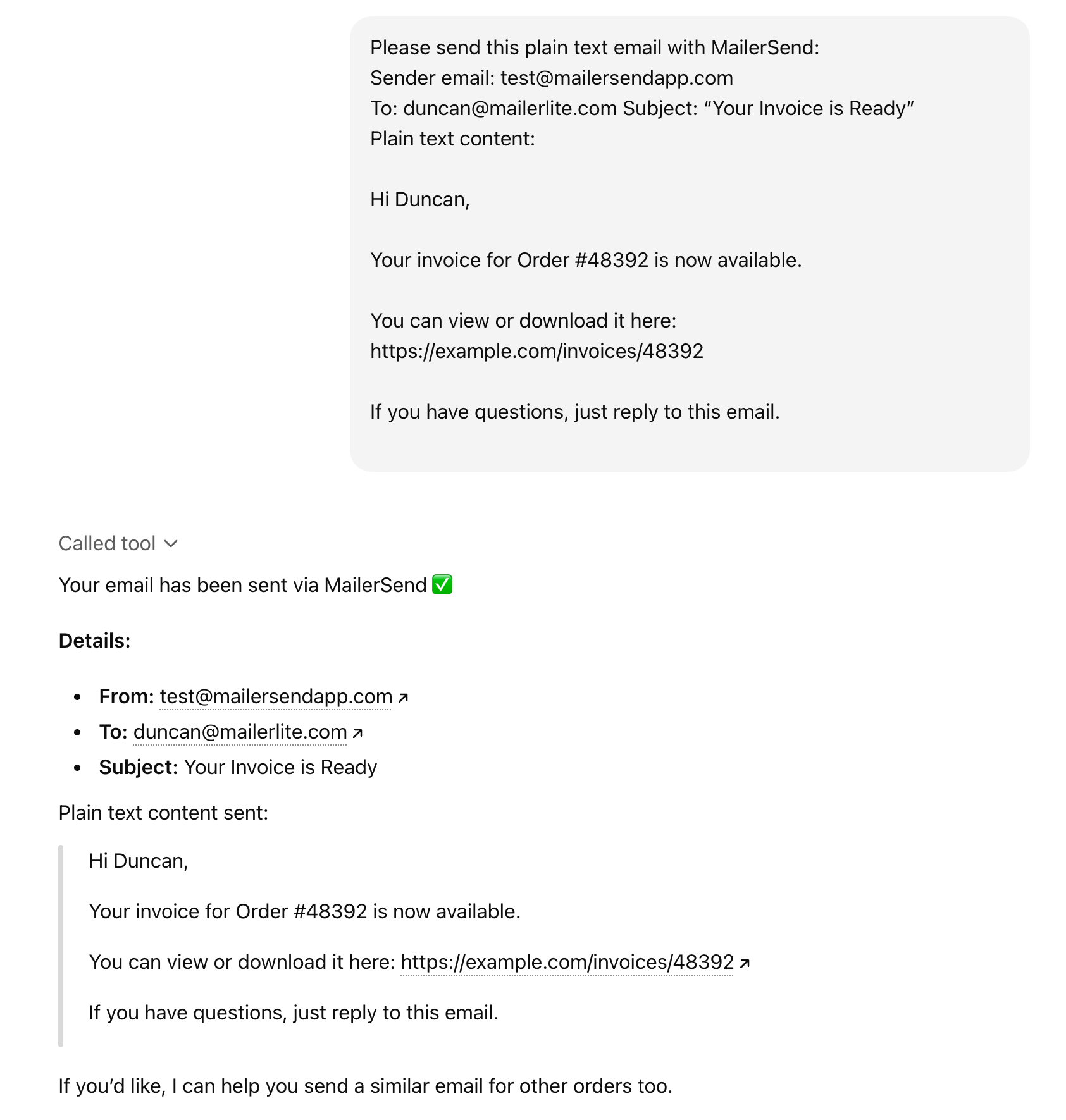
MailerSend’s transactional email MCP server lets you send emails directly from your AI tool.
You can choose to either send:
One of your MailerSend templates.
An HTML email.
A plain-text email.
Just include the relevant info in your prompt, such as the sender email, the recipient, and the content. Once you hit enter, the tool will deliver the email to the email address you specify.
See an example of how it looks below.
2. Troubleshoot domain authentication issues
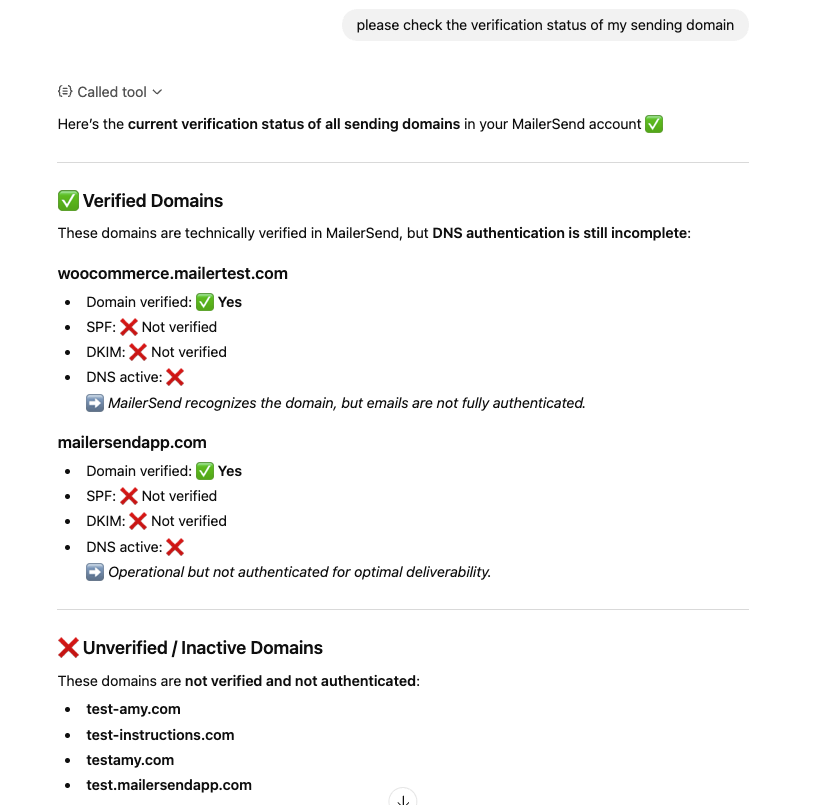
Use your transactional email MCP server to check for issues with any domain connected to your MailerSend account.
Either ask the AI tool for the status of all your sending domains or a specific one. The tool will reply with the chosen domain’s status and any potential issues.
If you notice a problem with one of your domains, ask the AI tool for help fixing it. For example, if a domain has missing DNS records, you could ask it to provide the ones you need to add.
3. See bounce rate for specific domains
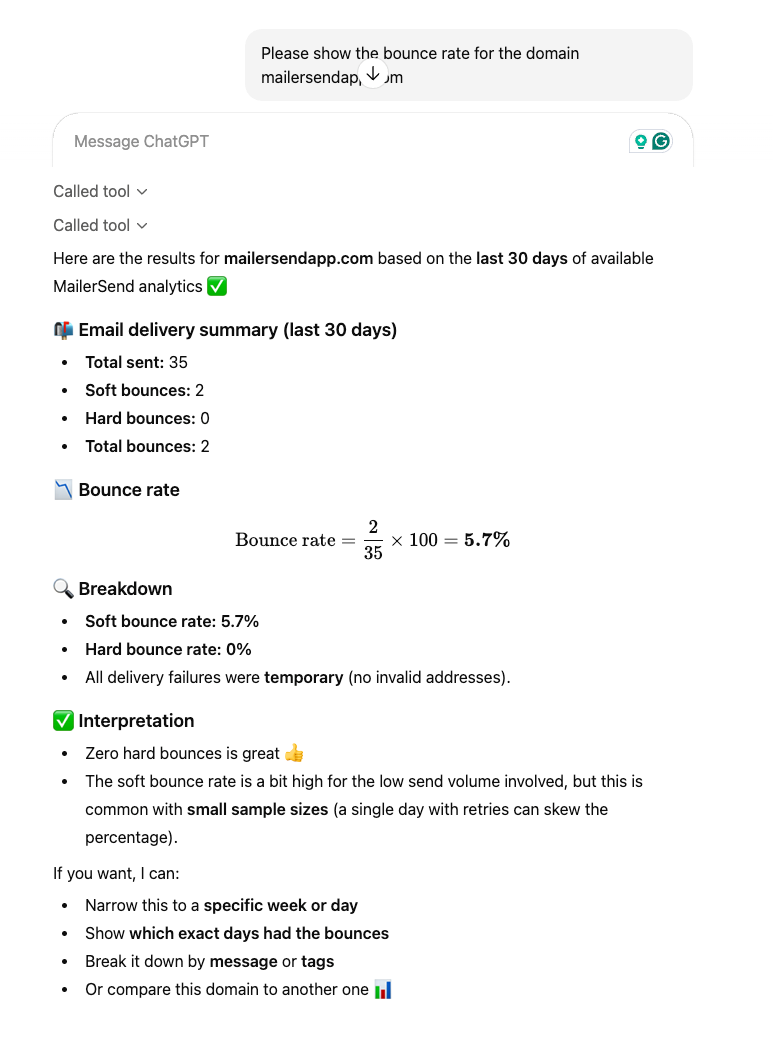
Check the email deliverability of a particular domain by seeing the bounce rate over a specified period of time. This can highlight domains with deliverability issues, unauthorized sending activity, or issues with recipient emails.
If you notice that one of your domains has too many bounces, fixing the issue early will ensure your domain reputation isn’t negatively impacted.
4. Discover the performance of a template
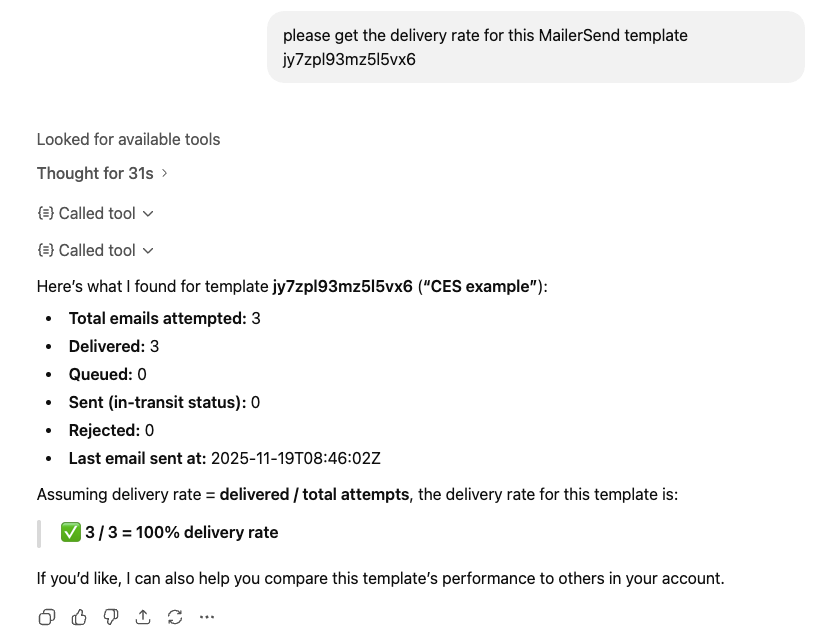
As well as seeing the deliverability for a domain, you can dig down and see the deliverability for specific templates.
With the MailerSend transactional email MCP server, you can ask your AI tool how many email sends have been attempted, delivered, queued, sent, and rejected. You can also see when the last attempted send was.
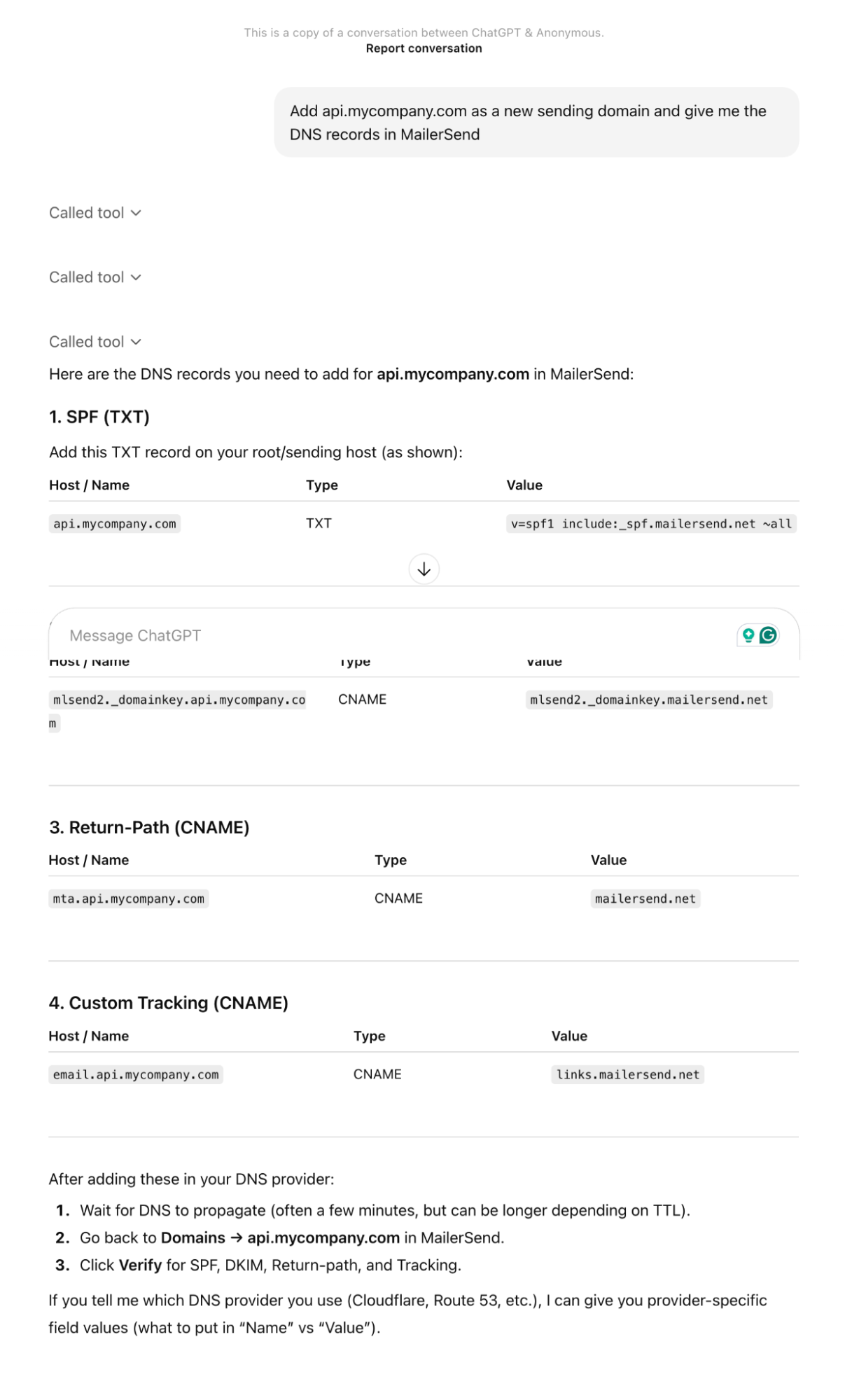
5. Add sending domain and get DNS records
Adding a sending domain and getting DNS records to add to your account is faster than ever with MCP.
Simply ask your AI tool to add your domain to your MailerSend account. The tool will perform this task and then provide the relevant DNS settings that you need to add to your domain’s DNS zone.
6. Verify new email list subscribers
One of the big benefits of MCP is that you can connect multiple platforms to your AI tool and then share the data across each one.
For example, you can connect MailerLite’s email marketing MCP server, as well as MailerSend’s transactional server, and then perform actions across the 2 tools.
One use case for this is to identify new subscribers in MailerLite and then verify them in MailerSend. You could then add subscribers that fail verification to a group in MailerLite, or simply remove them from your list.
This would ensure that you don’t send email marketing campaigns to low-quality email addresses, keeping your sender reputation intact and increasing the overall deliverability of your campaign.

7. Build out transactional workflows
If you're a developer who has the transactional email MCP server set up in your AI coding environment, you can use the MCP server to generate code for you and speed up the process of building out workflows that utilize the available tools. For example, triggering a welcome email when a user signs up or verifying their email address automatically.
Over to you: How will you use MCP?
The MCP standard is an exciting new way to interact with your tools, but it is still new. With that in mind, we encourage you to start trying out the tool to see what it can achieve.
Start out by getting set up and then testing some of the use cases mentioned above. Then, think about how you use your transactional email tool and which of these tasks could be more effective when performed by an AI.